

Pixoo Max is best understood as a 32x32 pixel canvas with a companion app, not as a miniature high-resolution monitor. Its appeal is the ability to display expressive pixel art, short animations and compact status graphics in a small space. The tradeoff is equally clear: the grid is intentionally low resolution, the richer workflow depends on the app, and it needs a practical power connection.
This refresh removes stale Kickstarter, historical price and third-party hotlink claims. The useful buying question is whether a configurable pixel canvas belongs in your room, stream setup or desk—not whether it can replace a photo frame or dashboard.
The independent review above helps set expectations for the physical experience. Use the current Pixoo Max product page for the latest package, availability and supported features.
What the 32x32 grid is good at
- Bold pixel art that reads from across a desk or shelf.
- Short animations, icons and looping scenes.
- Compact clocks, alerts or status graphics when supported by the current app.
- A visual focal point for a gaming room, creator desk or retail counter.
What the grid cannot do
Thirty-two pixels across is not enough for detailed photography, fine typography or color-critical work. Images are interpreted as pixel art, so a clean source image may need deliberate simplification before it looks good on the display.
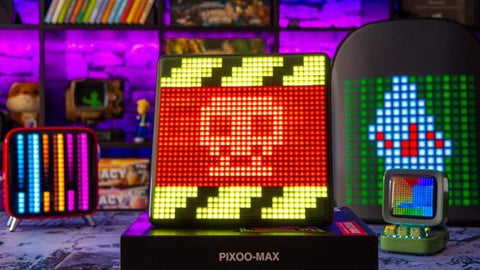
The app is part of the product
The app handles setup, content discovery, editing and channel management. That is a strength if you want a large library of community art; it is a limitation if you prefer a completely offline appliance. Online data channels and integrations can change, so verify the exact service you need before purchase.
Placement and daily use
| Option | Best for | Watch for |
|---|---|---|
| Desk or shelf | Pixel art and compact status | Plan for continuous power and viewing distance |
| Streaming background | Animated identity and alerts | Avoid tiny text and glare |
| Family photo display | Occasional stylized images | Choose a higher-resolution frame instead |
| Live dashboard | Simple supported metrics | Integrations may change |
Who should buy Pixoo Max?
Buy it if you already enjoy pixel art, want a configurable visual accent and accept the app-led workflow. Skip it if your priority is detailed photos, a large information dashboard, battery operation or a plug-and-forget device.
What to verify before ordering
- Confirm the current product page still lists the features you need.
- Check power placement and the viewing distance in your room.
- Test whether the app supports your intended data source.
- Prepare a few 32x32-friendly images before importing a large library.
Frequently asked questions
Is Pixoo Max a digital photo frame?
No. It can stylize images as pixel art, but it is designed around a 32x32 LED canvas rather than detailed photography.
Does Pixoo Max need the app?
The app is central to setup and the richest content workflow. Exact offline capabilities depend on the current firmware and features.
Can it show live online information?
Supported channels may show compact data, but integrations and third-party services can change. Verify the current app before buying for one metric.
Is the current price the same as old reviews?
Do not rely on old review or Kickstarter prices. Check the current official product page and retailer terms.
Bottom line: Pixoo Max earns its space when you want an animated pixel canvas with personality. Its low-resolution grid, app dependence and power requirement are not hidden flaws; they are the conditions of the product's appeal.


