

Le Divoom Pixoo, Pixoo Max et Pixoo 64 partagent un écosystème d'art pixelisé, mais ne sont pas interchangeables. Pixoo est le choix compact et portable ; Pixoo Max vous offre une toile 32x32 plus grande ; Pixoo 64 est l'option permanente à haute résolution pour des œuvres plus grandes et des mises en page de données prises en charge. Choisissez en fonction de l'endroit où l'écran sera utilisé et de ce que vous souhaitez afficher, pas seulement selon le nom du modèle.
Cette mise à jour supprime les anciennes affirmations difficiles à vérifier aujourd'hui, y compris les déclarations historiques sur la batterie, le contrôle vocal, le flux en direct et les prix. Confirmez les détails actuels du package et le support de l'application sur chaque page officielle avant de commander.
L'avis indépendant sur le Pixoo Max offre un contexte physique utile. La comparaison ci-dessous est un cadre d'achat ; les spécifications actuelles appartiennent aux pages officielles des produits Pixoo, Pixoo Max et Pixoo 64.
Choix rapide
| Modèle ou choix | Meilleur choix | Principal compromis |
|---|---|---|
| Pixoo | Accent portable, écran de chevet ou cadeau | Petite grille limite les détails et le texte |
| Pixoo Max | Centre de bureau et art pixel créatif | Le contenu 32x32 nécessite encore une simplification |
| Pixoo 64 | Installation permanente sur bureau ou mur avec des mises en page plus grandes | Nécessite une alimentation continue et plus d'espace |
Choisissez Pixoo pour la portabilité
Pixoo est pertinent lorsque l'écran doit être déplacé entre les pièces, placé à côté d'autres objets ou utilisé comme premier appareil d'art pixelisé accessible. Sa toile plus petite favorise les icônes audacieuses, les animations courtes et les horloges simples. Cette contrainte fait partie du charme, mais signifie aussi que les œuvres détaillées et les petits textes ne seront pas aussi nets que sur une grille plus grande.
Choisissez Pixoo Max pour un centre visuel plus fort
Pixoo Max offre plus d'espace pour l'art pixelisé sans devenir un grand écran mural. C'est un bon choix intermédiaire pour un bureau, une configuration de jeu ou un arrière-plan de créateur où l'art animé compte plus que l'information dense. Préparez les œuvres pour la grille réelle et vérifiez comment l'application gère les chaînes communautaires actuelles avant de dépendre d'une fonctionnalité en ligne.
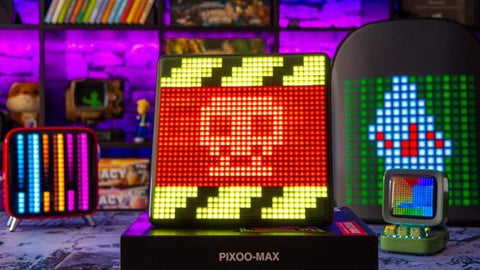
Choisissez Pixoo 64 pour des données ou œuvres d'art permanentes
Pixoo 64 est mieux adapté lorsque l'écran a une place fixe et que vous souhaitez plus d'espace pour des mises en page lisibles, de grandes scènes en pixels ou du contenu de type tableau de bord pris en charge. Ce n'est pas l'option portable : prévoyez l'alimentation, le câblage et une distance de vision adaptée à la grille.
Comparez le flux de travail, pas seulement la grille
- Contenu : les trois sont conçus autour du pixel art et d'une bibliothèque pilotée par application, mais la quantité de détails lisibles à l'écran varie avec la grille.
- Placement : une revendication de batterie ou de lecture locale doit être confirmée pour le modèle et le firmware exacts actuels.
- Gestion : l'application, le Bluetooth, le Wi-Fi et les canaux en ligne peuvent changer ; n'achetez pas un modèle pour une seule intégration non vérifiée.
- Entretien : les écrans plus grands nécessitent un câblage plus soigné et une préparation plus attentive des œuvres.
Qui devrait éviter chaque modèle ?
Évitez Pixoo si vous avez besoin de texte détaillé ou d'une grande mise en page d'informations. Évitez Pixoo Max si vous voulez un cadre photo haute résolution classique. Évitez Pixoo 64 si vous avez besoin de portabilité sur batterie ou si vous n'avez pas d'emplacement permanent sur un bureau ou un mur.
Une séquence de décision sûre
- Mesurez la surface prévue et confirmez l'accès à l'alimentation.
- Décidez si le contenu principal est de l'art, une horloge, des photos ou des données en ligne prises en charge.
- Ouvrez l'application actuelle et vérifiez la fonctionnalité qui vous intéresse.
- Testez quelques images à la taille de grille cible avant de constituer une grande bibliothèque.
Questions fréquemment posées
Quel Pixoo est le meilleur pour un cadeau ?
Pixoo est le choix compact le plus simple lorsque la portabilité et le pixel art accessible comptent. Confirmez les détails actuels de la batterie et du package sur la page officielle.
Pixoo Max est-il un cadre photo ?
Non. Il peut styliser les images en pixel art, mais il n'est pas conçu pour la photographie haute résolution détaillée.
Pixoo 64 est-il meilleur pour les données en direct ?
Sa grille plus grande est mieux adaptée aux mises en page de données lisibles prises en charge, mais les intégrations peuvent changer. Vérifiez d'abord la fonctionnalité actuelle de l'application.
Les trois utilisent-ils la même application ?
Ils partagent l'écosystème Divoom, mais les commandes exactes et la connectivité varient selon le modèle et le firmware. Utilisez la page produit et le manuel actuels pour l'appareil choisi.
En résumé : choisissez Pixoo pour une portabilité compacte, Pixoo Max pour un centre créatif équilibré, et Pixoo 64 pour un affichage permanent plus grand. Le bon modèle est celui dont les limites physiques correspondent au contenu que vous montrerez réellement.


